RealSheet scores are written in the lightweight ABC format,
which is ideal for creating lead sheets containing melody, chords and lyrics.
ABC was originally designed for folk tunes,
but it has also proven to be perfect for jazz lead sheets and other genres.
Creating a lead sheet
ABC is easy to learn and understand.
You won't need any special music notation software.
Simply write your score in a text editor.
For example, this code:
X:1
T:Oh When the Saints
C:Traditional
L:1/4
M:4/4
Q:1/4=120
K:C
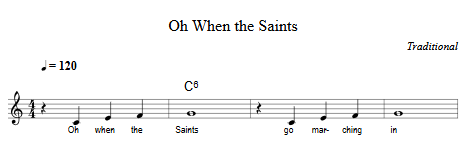
z C E F | "C6" G4 | z C E F | G4 |
w:Oh when the Saints | go march-ing in
will create this score:
If you want to start writing your own tunes, check out abcnotation.com. There, you'll find documentation, tutorials, software and lots of useful information.
We provide our own editor that lets you write ABC code, preview the score, generate audio and save the ABC file:
RealSheet ABC Editor
Converting songs from MuseScore and other music notation software
Most music notation software allows you to export scores in MusicXML format.
This can then be converted to ABC format using software such as
easyABC.
A tunebook is a collection of songs in a single file.
If you have more than one song, we recommend
combining them into a tunebook for for easier handling.
To do so, simply add the songs to a text file, leaving an empty line between each song.
Importing tunes or tunebooks into the app
To import your own files,
click on 'Advanced options' on the 'Edit Tunes' screen.
You can download a tunebook from an external source via a URL here.
Alternatively, you can select a file from a cloud service or local storage.
Use the extension '.abc' for tunes and '.abct' for tunebook files.
Publishing your tunebooks
If you want to make your own tunebooks available to other users, you can implement a direct import link.
This allows your visitors to load your music into the RealSheet app with a single click.
Link format:
https://realsheet.net/import/?i=[URL]
where [URL] is the direct URL to your tunebook file.
Please use .abc or .abct as the file extension for your ABC file.
Paste your tunebook URL here to create an import link: